
Acunetix as automated penetration testing software
To assess the security of web applications and APIs, organizations need a mix of automated security testing and expert manual penetration testing. Acunetix supports that process by providing automated penetration testing software that helps security teams discover vulnerabilities, validate exploitable findings, and prioritize remediation before attackers can take advantage of security weaknesses.
Automated vulnerability scanning and manual penetration testing serve different roles in cybersecurity. Penetration testers are too valuable to spend time manually confirming common vulnerabilities that reliable tools can find at scale, while automated scanners cannot fully replace human judgment for issues such as business logic flaws. Used together, they give security professionals a more complete view of web application security.
Acunetix is commonly used as an initial penetration testing tool for web applications and APIs. It helps identify issues such as SQL injections, cross-site scripting (XSS), misconfigurations, exposed attack surface, and many OWASP Top 10 vulnerabilities. With accurate scanning, mature payloads, proof-based validation for many findings, and a low false-positive rate, Acunetix helps penetration testers and security teams focus on vulnerabilities that are more likely to matter in real-world attacks.

Automated penetration testing tool
If you work as a penetration tester, ethical hacker, red team member, or application security professional, Acunetix can support your workflow in several ways, depending on your testing scope and workload.
- You can run Acunetix before a manual penetration test to find common web application vulnerabilities such as SQL injection, cross-site scripting (XSS), security misconfigurations, vulnerable components in the application or web server tech stack, and other issues across your web attack surface.
- After a scan, Acunetix can provide proof that many detected vulnerabilities are real and exploitable. This helps reduce time spent validating false positives and gives testers more time to investigate complex attack vectors, chained exploits, and business logic issues.
- If you prefer to rely on manual testing for exploitation and analysis, you can still use Acunetix as a user-friendly tool to crawl the web app, map its structure, discover inputs and endpoints, and provide a more complete target inventory for further testing.
More than web vulnerability scanning
Acunetix started as a web vulnerability scanner and has grown into a broader vulnerability assessment and vulnerability management solution for web applications and APIs. It provides integrations and API functionality that help security teams connect testing results to the rest of their application security workflow.
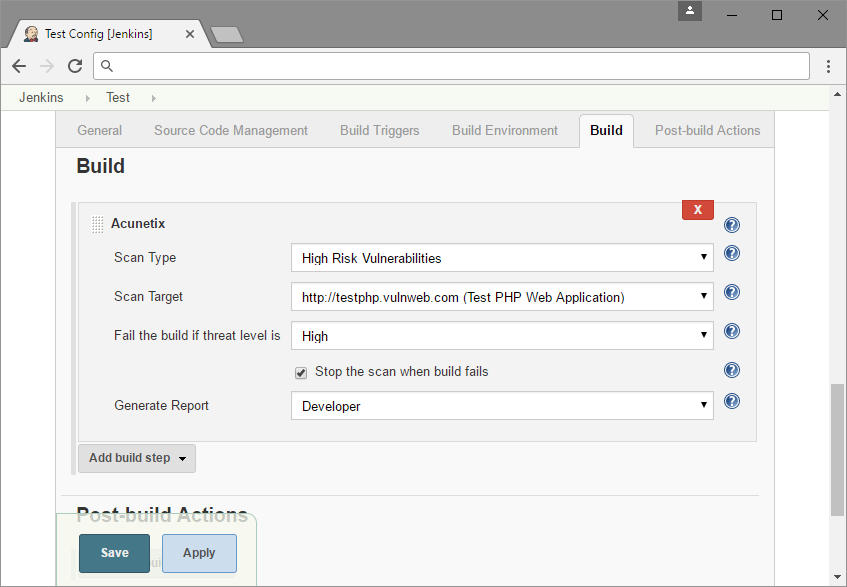
- You can use Acunetix in the software development lifecycle to automate security testing. For example, scans can be triggered from CI/CD tools such as Jenkins to check new builds before they reach production.
- Acunetix can integrate with issue trackers such as Jira, GitLab, and other development tools so security teams can assign findings, track remediation, and manage vulnerabilities alongside other development work.
- Acunetix can also work with other security tools for real-time remediation. For example, teams can use scan results to support temporary web application firewall (WAF) rules while developers work on a permanent fix.
Further manual information security testing
Acunetix is focused on web application and API security testing. For a complete penetration test or security assessment, you may also need manual testing and specialized tools that cover network security, infrastructure, wireless security, password testing, and other parts of the environment.
- While Acunetix can test for weak passwords using built-in or supplied dictionaries, penetration testers may perform additional password auditing with tools such as John the Ripper or THC Hydra, depending on the authorized scope.
- Acunetix does not test Wi-Fi security. For wireless assessments, testers may use dedicated tools such as aircrack-ng to check for WEP/WPA weaknesses where permitted.
- For deeper manual web, network, and traffic analysis, testers may use free and open-source pentesting tools, including packet analyzers, sniffers, brute-force tools, testing frameworks, open port scanners, network mappers, and exploit frameworks. Common examples include Kali Linux, Zed Attack Proxy (ZAP), w3af, Nmap, Metasploit, Wireshark, sqlmap, and similar tools.
Frequently asked questions
The term penetration testing software is used to describe any software that can be used for performing manual or automated penetration tests. This includes network security and web security tools as well as many others. Vulnerability scanners are considered automated penetration testing software.
There are many free and professional penetration testing tools. These tools include automated vulnerability scanners like Acunetix. They also include manual tools like attack proxies (e.g. Burp Proxy), password crackers (e.g. John the Ripper), exploit frameworks (e.g. Metasploit), or even complete operating system distributions (Kali Linux).
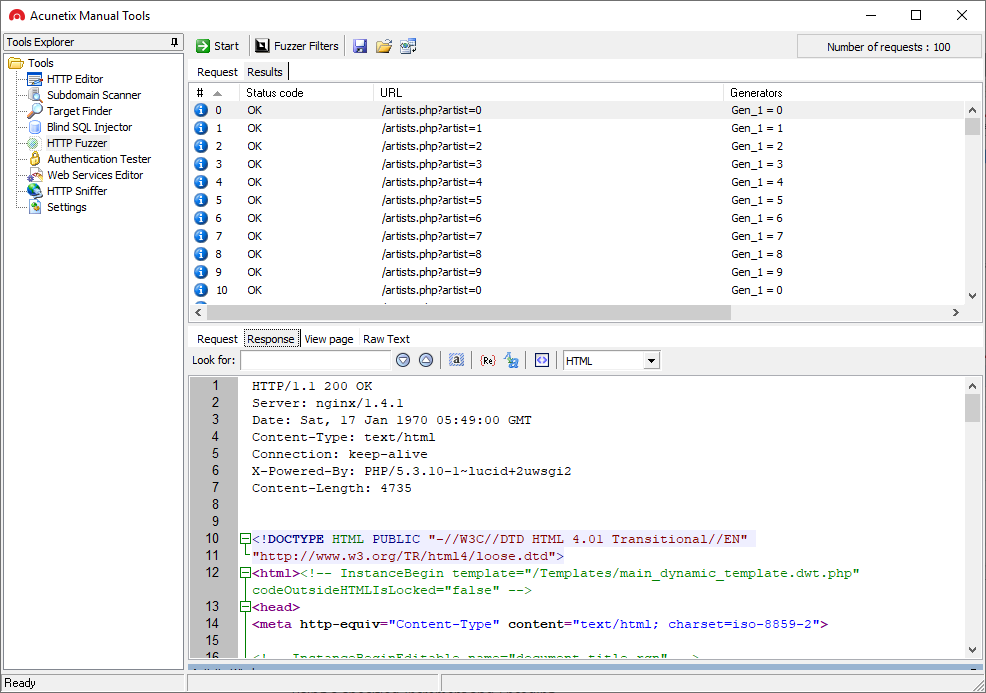
Acunetix also provides simple free manual penetration testing tools.
You should do both. Vulnerability scanning is considered as automated penetration testing or as initial penetration testing. A vulnerability scanner can find 99% of vulnerabilities, but not all of them. That is why it is useful to follow up with additional manual penetration testing.
Read about the differences between vulnerability scanning and penetration testing.
You should do both. Vulnerability assessment is the stage that follows vulnerability scanning and penetration testing. A professional product like Acunetix first finds all vulnerabilities. Then it assesses their potential impact based on the severity of the vulnerability and the importance of the business asset.
Read about the differences between penetration testing and vulnerability assessment.
Recommended Reading
Learn more about prominent vulnerabilities, keep up with recent product updates, and catch the latest news from Acunetix.




“We use Acunetix as part of our Security in the SDLC and to test code in DEV and SIT before being promoted to Production.”
Kurt Zanzi, Xerox CA-MMIS Information Securtiy Office, Xerox